Updates & News
Important Information for SNAP Cardholders: High-Risk Transaction Block
To help protect SNAP benefits from electronic theft, all SNAP EBT cards were automatically enrolled in a new “High‑Risk Transaction Block” on May 13, 2026. Most people will not notice any changes when shopping in person at Ohio grocery stores.
If you need to make a purchase that falls under a “high‑risk” category, you may need to temporarily turn this block off. You can turn it back on at any time.
When do I need to unlock my card?
You will need to briefly turn off the “Block High‑Risk Transactions” setting if you are:
- Ordering groceries for pickup or delivery
- Shopping out of state (including Indiana, Kentucky, Michigan, Pennsylvania, or West Virginia)
- Using “scan and go” self‑checkout apps like Meijer’s Shop & Scan or Sam’s Club’s Scan & Go
How do I lock or unlock my card?
You can lock or unlock your card 24/7 using any of the following:
- The ConnectEBT mobile app
- Online at ConnectEBT.com
- By calling 1‑866‑386‑3071
Keeping your card locked when you’re not making a purchase is the best way to protect your benefits. Please share this tip with others who use SNAP
More reminders will be shared through online banners, messages in the Self‑Service Portal, and upcoming phone calls and text messages.
Quick Tips!
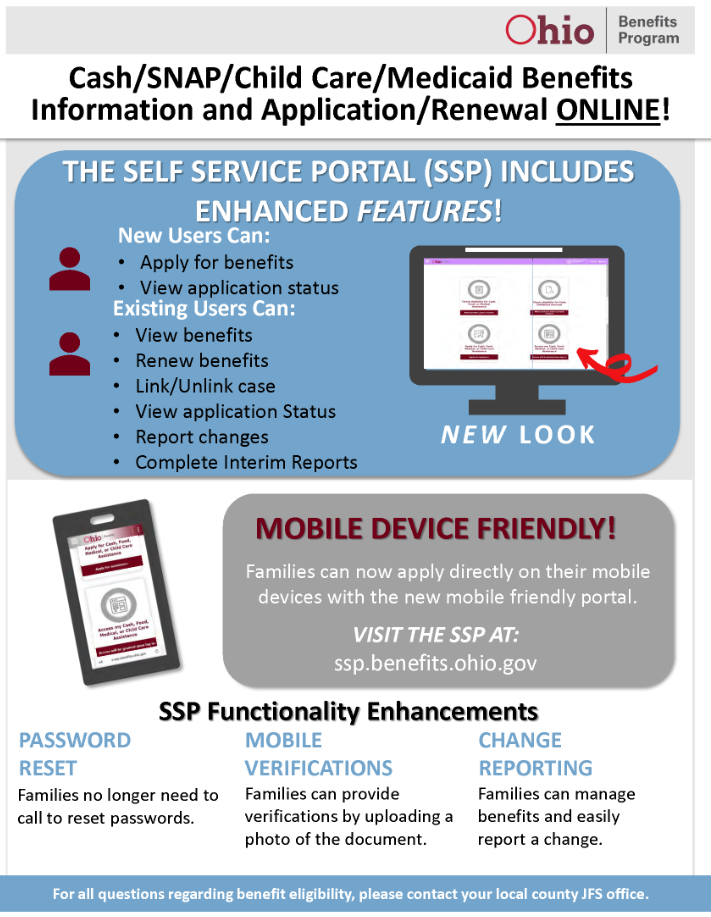
Now you can apply for cash assistance, food assistance and Medicaid online, wherever you can access the internet. Just go to https://benefits.ohio.gov and click “Apply for Benefits.”
- Note that the application portal is not available during the following times:
- 2-6 a.m. and 9-10 p.m. daily, and
- The second Sunday of each month
- The Web site works best if you use Internet Explorer 6.0 or higher. If you need help, each page has a help screen that:
- Explains the questions on the page
- Has a link to an online “Help” page to assist you with the application
- Contains a “Contact” link at the bottom of the page where you can find your county agency’s phone number.
- You can save your application and finish it later. You must submit the application within 30 days of when you start it, or it will be deleted. .
- Do not use the “back,” “forward” or “stop” buttons on your Internet browser to move around in the application. Use the buttons at the bottom of each page to move from page to page within the application.
- As you move through the application, the progress bar on the left side of the screen will turn green when you are done with each section.
- The more information you can provide, the easier it will be to process your application.
- Applications submitted before 5 p.m. (EST) Monday through Friday will be received by your county agency that same business day.
- If you submit your application after 5 p.m. (EST), on a weekend or on a holiday, the county agency will not receive it until the next business day.
- After you submit your application, you will receive a confirmation number and e-mail. Be sure to keep these handy when contacting your county.
SNAP EBT Card Lock Feature
To assist Ohioans in securing their SNAP benefits, a new card lock feature became available July 1, 2023 in the ConnectEBT mobile app. The card lock feature allows the cardholder to lock their card when not in use. Cardholder should consider setting their card to a locked status until they are actively making a purchase with the EBT card. Once the purchase is successful the cardholder can then lock their card again using the ConnectEBT mobile app.
Additionally, ODJFS is working to implement card activity alerts in the ConnectEBT mobile app. These alerts are planned to be available in the fall of 2023 and will notify the card holder when their card has been used to make a purchase, receive a refund for a return, PIN changes and deposits. ODJFS will share additional information regarding this feature as the implementation date approaches.
SKIMMING: What is happening?
According to the Federal Food and Nutrition Service, Ohio is among a number of states being targeted by criminals stealing Supplemental Nutrition Assistance Program (SNAP) benefits. This is known as skimming. In skimming, criminals use a device placed over a point-of-sale card reader that steals information from payment cards like SNAP EBT and cash assistance cards. This means SNAP or cash assistance benefits could be stolen without you knowing.
If you have fallen victim to EBT skimming, please follow the link to download and print the necessary form to be completed and returned to PA.
If you are contacted by phone or receive a text message stating that you must call back immediately or your EBT account will be suspended, this is an attempt to steal your SNAP benefits. To protect your SNAP benefits, never share your card number or PIN unless you are calling the EBT customer service line directly, 1-866-386-3071.
Sign up for text messages!
You can sign up to receive text messages one of 3 ways through our Call Center 1-844-640-6446:
- You can sign up during interactive interviews to apply or reapply for public assistance benefits.
- You can sign up during calls to a Customer Service Representative.
- You can follow the prompts on the automated system:
- Select option no. 2
- Authenticate your information
- The system tells the status of your case
- Select option no. 2 to sign up for text messages and alerts
- Select 1 to agree, or 2 to decline
- Select 1 to sign up with the number you are calling from or; 2 to sign up with a different number
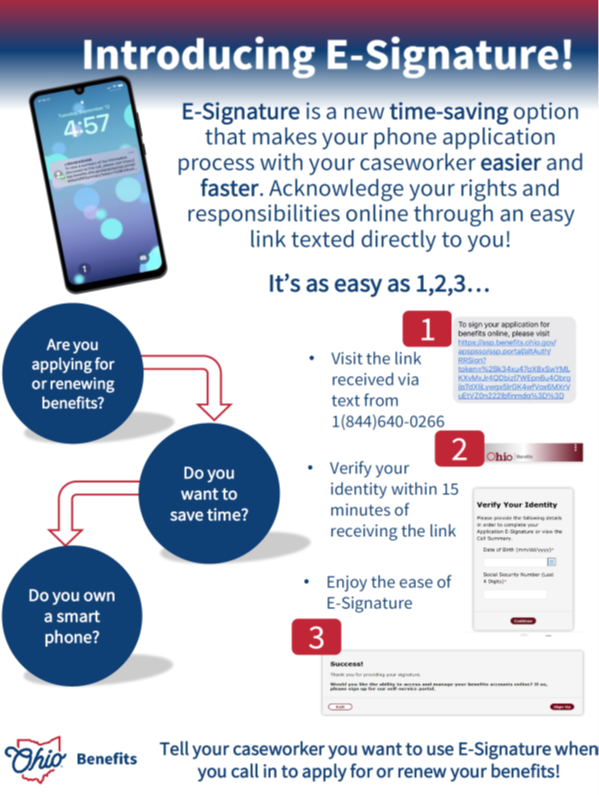
Introducing E-Signature!
The Self Service Portal